Smart Calendar
Reduce no-shows, automate booking, and never double-book again. Clients book themselves 24/7.
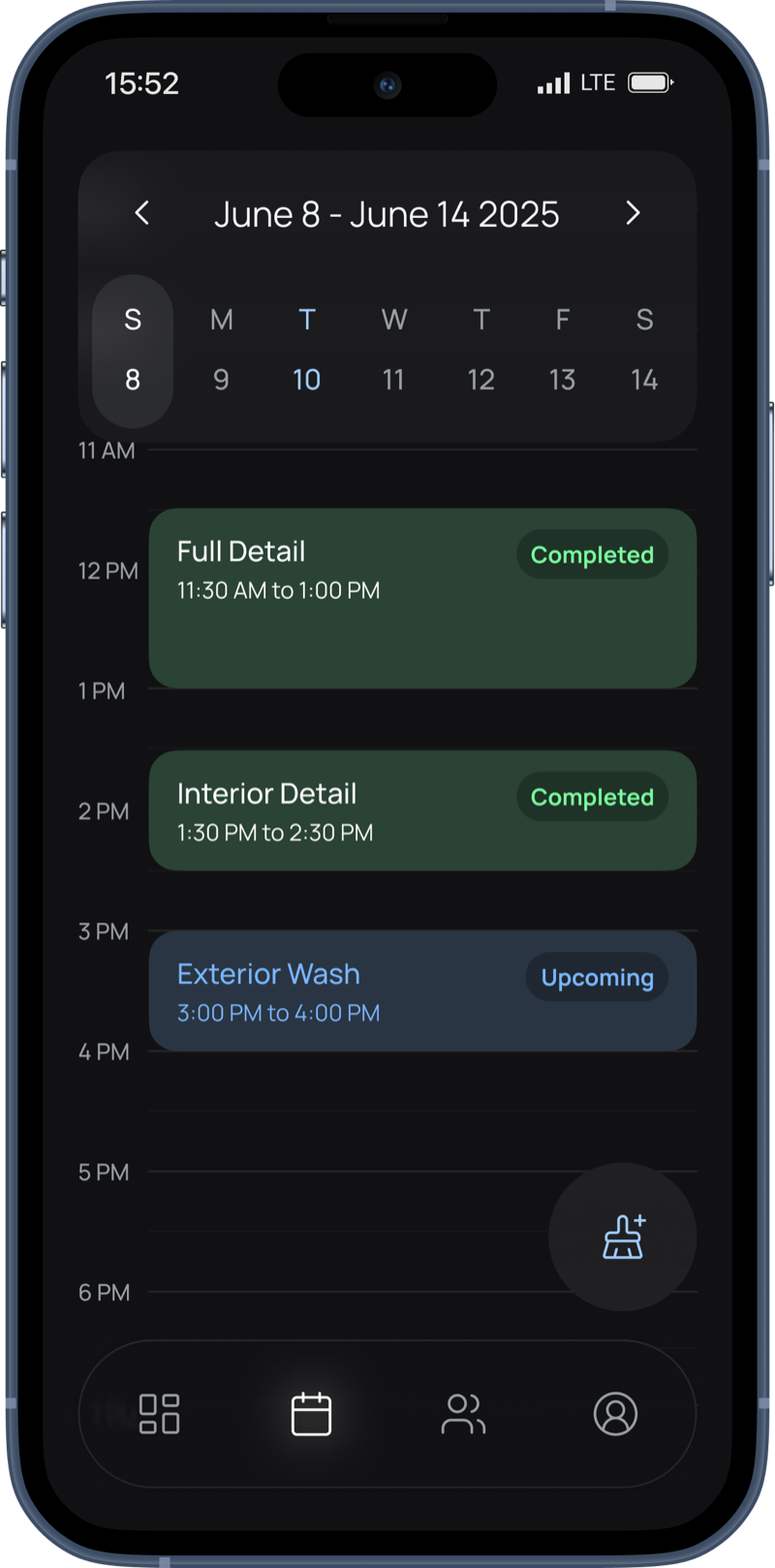
Overview
Double-bookings are the silent killer of detailing businesses. You accidentally book two ceramics for Saturday at 10am. Now you're apologizing to one client, rescheduling another, and looking unprofessional. Or worse. you forget about a booking entirely and a client shows up to an empty driveway.
The average detailer spends 5+ hours per week on scheduling. texting back and forth, checking calendars, confirming times. That's 250+ hours per year not detailing cars.
Detaild's calendar eliminates the chaos. Set your working hours once. When clients book through your booking page, the system automatically blocks that time. When you add a job manually, same thing. Every appointment, every block. synced in real-time. It's literally impossible to double-book.
But it's not just about preventing mistakes. A smart calendar gives you your life back. Block out lunch. Block out your kid's soccer game. Take a vacation without fielding booking requests. Your calendar is your schedule. and it should work for you, not against you.
How it works
-
Set your working hours & days offMonday-Friday 9am-5pm? Weekends only? Different hours each day? Set it once and forget it. Your availability updates everywhere automatically.
-
Clients see only open slotsNo back-and-forth texting. They pick from your actual available times on your booking page. If it's blocked, they don't see it.
-
Bookings auto-block calendar timeClient books a 4-hour ceramic coating? Calendar blocks 4 hours automatically. Service duration determines block length. no manual adjustment needed.
-
Never double-bookReal-time sync across everything. Client bookings, manual adds, personal blocks. all coordinated instantly. Two people can't book the same slot.
Key Features
Real-Time Availability
Clients see only your actual open time slots. When someone books, that time is instantly blocked everywhere. Zero double-bookings, zero scheduling conflicts, zero embarrassing apology calls.
Flexible Working Hours
Set different hours for each day. Monday 9am-6pm, Tuesday off, Wednesday 10am-4pm, weekends 8am-2pm. Your schedule, your rules. Change it anytime.
Block Personal Time
Block off time for lunch, family events, doctor appointments, or vacations. Clients can't book blocked times. Protect your personal life without awkward explanations.
Automatic Reminders
Get SMS and email reminders 24 hours before appointments. Client name, service, time, and address. everything you need. Never forget a booking or show up late again.
Day/Week/Month Views
View your schedule by day for detailed planning, week for the upcoming workload, or month for the big picture. Switch views instantly. Plan ahead or focus on today.
Client Info at a Glance
See client name, vehicle, service type, and notes directly in the calendar. Know exactly who you're detailing and what they need before you arrive. No digging through messages.
Recurring Bookings
Set up clients on weekly, biweekly, or monthly recurring schedules. The full series auto-generates on your calendar — every Saturday at 10am for the next 6 months, locked in. Predictable revenue, predictable workload. Cancel or adjust any individual occurrence without breaking the series.
Cancel Appointment Button
Dedicated cancel action separate from 'mark complete' — so cancelled jobs don't pollute your revenue analytics or earnings tracking. One tap to cancel with a reason; the time slot reopens for new bookings automatically.
Smart Calendar vs. Texts & Memory
Why a real scheduling system beats mental notes and message threads
How Detailers Use This
Prevent Double-Bookings
Client books ceramic coating for Tuesday 2pm (4-hour service). System blocks 2pm-6pm automatically. Another client tries to book 3pm. That time doesn't even appear. It's mathematically impossible to double-book.
Manage Multi-Day Jobs
Fleet customer needs 10 cars detailed over 3 days. Block out Monday-Wednesday 9am-5pm with one action. Your booking page shows you're unavailable those days. No interruptions, no conflicts.
Vacation Mode
Going on vacation next week. Block the entire week in 30 seconds. Clients see you're unavailable and book for the following week instead. When you return, your schedule is already set.
Same-Day Booking
It's 10am, schedule is light. Client texts asking if you're free today. Check calendar, see 2pm-6pm open. Book them manually with one tap. They get instant confirmation. Fill the gap, make the money.
Buffer Time Between Jobs
Need 30 minutes between appointments to travel? Set buffer time in settings. If a detail ends at 2pm, the next available slot shows as 2:30pm. No rushing between jobs, no late arrivals.
Common Questions
For any additional questions, contact us and we'll be happy to help.
How do I set my working hours?
Go to Settings > Availability. Set hours for each day of the week. For example: Monday 9am-6pm, Tuesday off, Wednesday 10am-4pm. You can also set different hours for different weeks or block specific dates for vacations.
What if I need to block time for personal appointments?
Tap any time slot in your calendar and select 'Block Time.' That time becomes unavailable for client bookings. Use this for lunch breaks, family events, doctor appointments, or anything personal. You can unblock it anytime.
Can I manually add appointments?
Yes. Tap any open time slot and select 'Add Appointment.' Choose the client, service, and duration. Great for phone bookings, referrals, or walk-ins. The appointment syncs to your calendar and blocks that time automatically.
How do reminders work?
You get automatic SMS and email reminders 24 hours before each appointment. Reminders include client name, service, time, and location. Clients also receive reminders so they don't forget either. You can send manual reminders anytime.
Can clients reschedule their own appointments?
Yes. When they book, they receive a confirmation email with a 'Reschedule' link. They can pick a new time from your available slots without calling or texting you. You get notified of the change instantly.
How does Detaild prevent double-bookings?
When a client books a time slot, it's instantly blocked from your calendar. When you manually add an appointment, same thing. Real-time sync ensures no two appointments can occupy the same time slot. Whether booked by clients online or added by you manually.
Ready to try Smart Calendar?
Start accepting bookings 24/7 and grow your detailing business.
Get Started Free